
This post contains product affiliate links. These are mainly on items/hotels/tours that I personally endorse & love. I may earn a small commission if you make a purchase, but at no extra cost to you.
Struggling to back up photos while travelling? Learn how to plan a smarter, low-stress backup workflow for unreliable Wi-Fi and slow upload speeds.

Backing up photos always sounds simple until you’re actually on the road. I’ve always felt this most on longer, more adventurous trips. Moving through places like Guatemala into Mexico, hopping between chicken buses, guesthouses and cafés, never quite sure what the internet will be like that day.
Some nights the Wi-Fi barely loads a webpage, let alone hundreds of photos. Other times I’m juggling dying batteries, limited plug sockets, and trying to balance a laptop on my knees in a cramped room or crowded bus terminal. There’s also that constant background stress of travel: leaving something behind in a hotel, knocking a hard drive, or realising too late that yesterday’s photos still only exist in one place.
What makes it harder is the unpredictability. One incredible day of shooting can leave me with hundreds of gigabytes of photos and video, and the next day I might have almost no internet at all. Uploading everything suddenly becomes impossible, and hoping for “better Wi-Fi tomorrow” isn’t much of a plan.
As a travel photographer working on shoots all over the world, I’ve learned very quickly how fragile your entire workflow can be. A stolen bag, a broken laptop, or a damaged drive is all it takes for weeks of work to disappear. When you’re shooting for clients, that kind of loss just isn’t acceptable. That’s why backing up my photos and videos has become as important as taking them in the first place – and why I’ve spent so much time refining a backup workflow that actually works on the road.
The way you move, copy, protect and upload your photos matters far more than any single piece of kit. That’s basically what this article is really about.
A smarter way to keep uploads stable on unpredictable networks

Once you’re actually travelling, the network stops being something you think about and starts becoming part of your backup setup whether you like it or not. I’ve lost count of how many times I’ve tried uploading photos while bouncing between cafés, guesthouses and random hotspots, only for the connection to drop halfway through or force me through yet another login page.
Speed is rarely the real issue. What breaks uploads is inconsistency. One minute things are ticking along nicely, the next the Wi-Fi drops out, times out, or reconnects with a completely new IP address. I’ve had uploads stall overnight, cloud accounts flag “suspicious activity”, and folders end up half-filled just because the network changed while I wasn’t looking.
This is where I’ve found proxy services can quietly help, without turning your setup into something complicated or technical. When I started relying more on cloud sync as a second or third backup, tools like Webshare helped smooth out some of that chaos. One simple improvement was choosing an endpoint closer to where I was travelling, which reduced latency and stopped large uploads from constantly starting and stopping. Another was using the proxy as a consistent exit point while hopping between networks, so my cloud accounts didn’t keep re-checking logins every time the Wi-Fi changed.
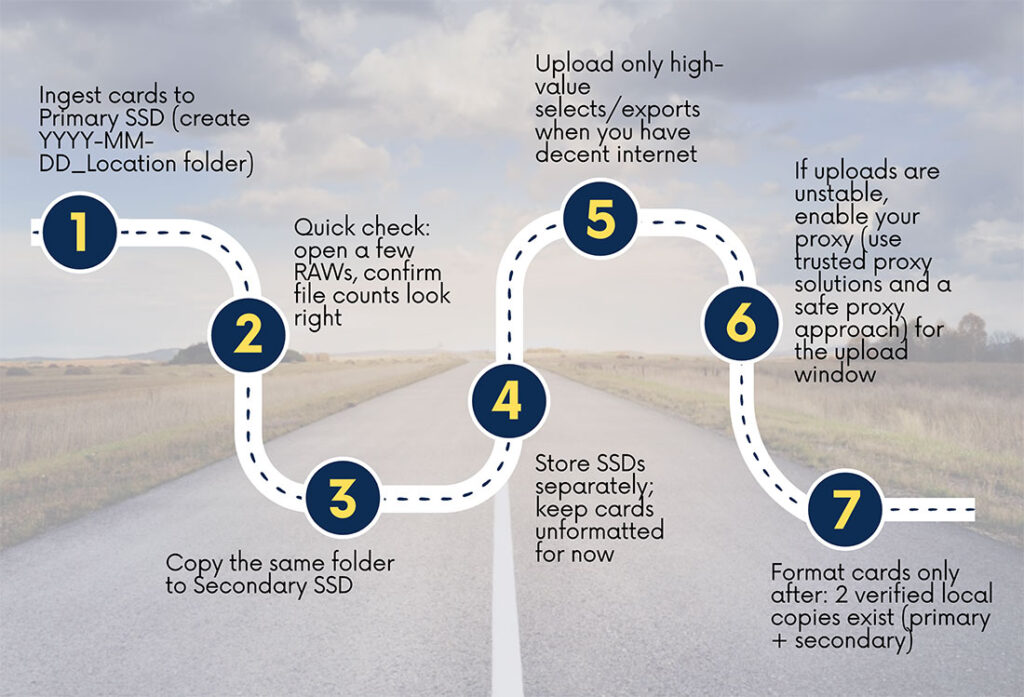
In some places, especially on public or hotel Wi-Fi, certain routes or ports just don’t behave well at all. I’ve had uploads fail repeatedly for no obvious reason. Running traffic through a proxy can help here too, because once your data leaves the hotspot, it follows a more predictable path. It doesn’t magically make the internet faster – but it does make uploads feel far less fragile, which is exactly what you want when you start something before dinner and hope it’s still running when you wake up.
Your biggest limit is still how fast your internet can send files. What you’re really getting is:
- fewer uploads that stop halfway
- fewer messy, half-filled folders
- a better chance that the upload you start before dinner is still working properly when you wake up in the morning
Planning backups around real-world bandwidth, not best-case Wi-Fi

A smart travel photo plan assumes the internet will let you down sometimes.
One way to stay realistic is to compare how many photos you shoot to how much mobile data people normally use in a month. One report says the average smartphone uses about 21 GB of mobile data per month in 2025 (with big differences between regions).
That matters because one really good shooting day can easily go past what many networks can handle smoothly, especially if you’re on hotel Wi-Fi or crowded public networks. It’s not that uploading is impossible. It’s that you need a plan that doesn’t depend on a perfect internet every night.
If you’re making hundreds of gigabytes of photos, the rule is simple:
- First, make local backups that are fast and close to you.
- Then treat cloud upload as something you do later, in pieces.
On the road, that usually means: at the end of each day, make at least two local copies (for example, on your laptop and on a backup drive) before you even think about the internet. Once that’s done, you can slowly upload smaller, important sets: your favourite shots, JPEG versions, or the folders you really cannot lose.
Full RAW uploads are something you save for rare moments when the internet is truly strong, or when you’re staying in one place long enough to let the upload run for several nights.
This way of thinking also lowers stress. Instead of asking: “How do I upload everything tonight?”, you ask yourself: “What must be safe tonight, and what can wait until the internet is good enough?”
Making resilience the default, even when travel gets messy

Over time, I’ve realised that the most reliable travel backup workflows borrow ideas from big, enterprise-level systems – then strip them right back to something you can actually carry in a backpack. The mindset shift is important. It’s not about copying files and hoping nothing goes wrong. It’s about knowing that if something does go wrong – a drive fails, you drop your laptop, or an upload dies halfway through – you can recover without losing sleep.
This idea shows up clearly in how professionals think about storage. Even organisations like NIST describe continuous data protection as a way to allow fine-grained recovery, not just one-off backups. On the road, that translates to building habits and systems that protect your work continuously, rather than relying on a single “backup night” when the Wi-Fi feels good.
There’s also a useful reality check here. Global mobile networks are carrying an enormous amount of data every month, and when you’re travelling you feel that competition directly. Hotel Wi-Fi slows down in the evening, café networks get overloaded, and your upload window is never really yours alone. You’re always sharing it with everyone else in the room, the building, or even the neighbourhood.
Once I accepted that, my approach changed. Instead of fighting the network or blaming myself when uploads failed, I built a workflow that assumes congestion, interruptions, and limited time, and still works anyway. That’s the real goal: not perfect conditions, but a system that succeeds even when travel gets messy.
As a travel photographer working on shoots around the world, backing up my photos and videos quickly became non-negotiable. When you’re on client jobs, the worst-case scenarios are always in the back of your mind – a laptop being stolen, a hard drive failing, or something getting damaged in transit. Losing that data simply isn’t an option when other people are relying on you to deliver. That pressure is what pushed me to build a backup workflow I could trust, even when I was moving fast and working in unpredictable conditions.